


How to Book a Waymo Ride for the First Time: A Step-by-Step Guide
Waymo is not a concept anymore. Driverless cars are picking up real passengers every day. If you have never taken one, the process might seem confusing. Do you need a special app? Can you book in advance? Where does it even work? This guide answers all of that.
Learning how to book a Waymo ride for the first time is simpler than you think. Download the app. Create an account. Enter your destination. Request the ride. The car shows your initials on the roof. You unlock it with your phone. You sit back and let it drive. No driver. No small talk just you and the road. This is what the future feels like.
Before You Book: Check Your City
Waymo is not everywhere. You need to be in a service area. Here is where it operates as of 2026.
Cities with the Waymo App
You can hail a ride directly through the Waymo One app in these cities :
- Phoenix, Arizona
- San Francisco Bay Area, California
- Los Angeles, California
- Miami, Florida
- Orlando, Florida
- Las Vegas, Nevada
- San Diego, California
- Dallas, Texas
- Houston, Texas
- San Antonio, Texas
- Nashville, Tennessee
- Denver, Colorado
- Tampa, Florida
Cities with Uber Only
In two cities, you cannot use the Waymo app directly. You have to book through Uber :
- Austin, Texas
- Atlanta, Georgia
This is important. If you are in Atlanta, downloading the Waymo app will not help you. You need Uber instead.
Read More: Waymo Mapping Technology Explained: How Cars Know Their Location

How to Book a Waymo Ride for the First Time Online
The process is simple. It takes a few minutes to set up. Then you can book rides whenever you want.
Step 1: Download the App
Get the Waymo One app from the Apple App Store or Google Play Store. The app is available for download in many countries, including India, Australia, Canada, and most of Europe . You can download it before you travel. That is helpful for tourists who want to be ready when they arrive.
Step 2: Create an Account
Open the app. Sign in with your Google account. Add a credit card. You will need to verify your phone number with an SMS code . This is the one step that can trip people up. Make sure your phone can receive texts. If you are travelling, check your roaming settings before you leave.
Step 3: Enter Your Destination
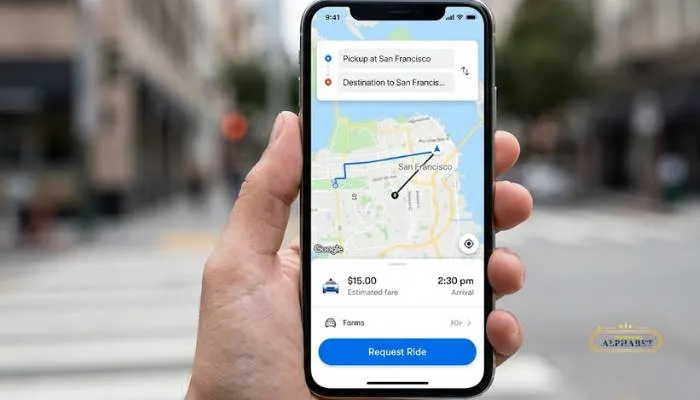
Once your account is set up, type in where you want to go. The app will find the best pickup spot near you . Waymo chooses safe locations for pickups and drop-offs. This might not be exactly where you are standing. Check the map to see where the car will meet you.
Step 4: Request Your Ride
Tap the button to request your ride. You will see the price before you confirm. Waymo shows you the cost upfront. There are no surprises later .
Step 5: Find Your Car
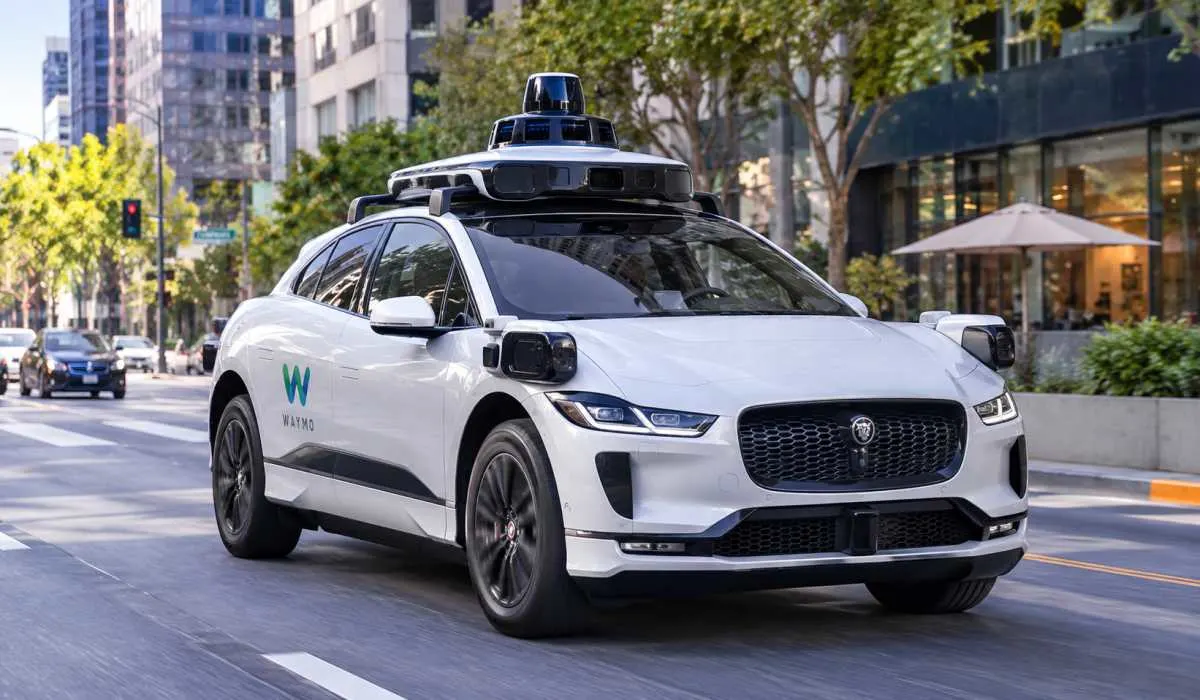
A Waymo car will be assigned to you. These are all-electric Jaguar I-PACE vehicles . They are white with sensors on top. The car will display your initials on a screen on the roof. That is how you know it is yours .
Step 6: Unlock and Get In
When the car arrives, use the app to unlock the doors. The car will unlock automatically when you are nearby using Bluetooth . Get in. Sit anywhere except the driver's seat. Up to four people can ride .
Step 7: Start the Ride
Inside the car, there is a screen. Tap "Start Ride" on the screen . The car will begin driving. You can watch the road on the screen. You can also see what the car's sensors see. If you need help, there is a button to contact Rider Support .
Can You Schedule a Waymo a Day in Advance?
No. You cannot book a Waymo a day ahead.
- You can schedule a pickup up to one hour in advance . That is the maximum. This is useful if you know you need a ride soon. You can set it and forget it. But you cannot plan your entire day around a Waymo booking. You have to request it closer to the time.
- For most people, this is not a problem. Waymo cars are available 24/7 in many cities . You can usually get one without much wait.
Waymo App for Tourists
- The Waymo app works for tourists. You do not need a US phone number to download it. You do not need a US credit card. You can use your home country's card.
- But there is one catch. You need SMS verification to create your account . If your phone can receive texts while travelling, you are fine. If not, set up your account before you leave home.
- Here is a tip for tourists. Download the app and create your account before your trip. Do the SMS verification at home where you know it will work. Then when you land, you are ready to ride. No delays. No stress.
- The app is available in many countries. You can download it from India, Australia, Canada, France, Germany, Japan, Singapore, and more . It is not restricted to the US.
You May Also Read: Waymo Safety System: How Self-Driving Cars Stay Safe
How to Book a Waymo in Atlanta?
Atlanta is different. You do not use the Waymo app. You use Uber .
Step 1: Update Uber
Make sure you have the latest version of the Uber app.
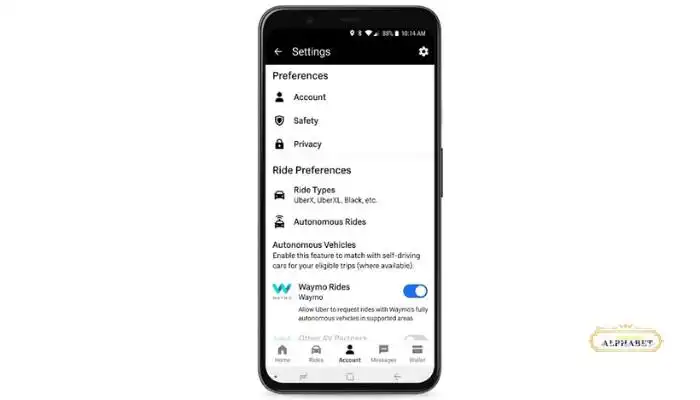
Step 2: Turn On AV Preference
Open the Uber app. Go to Account. Go to Settings. Find "Autonomous vehicles." Turn on the Waymo preference . This increases your chances of getting matched with a Waymo.
Step 3: Request a Ride
Request an UberX, Uber Comfort, or Uber Comfort Electric. If a Waymo is nearby, you might get matched . You will see a popup. You can accept the Waymo or choose a regular car instead.
Step 4: Unlock and Ride
When the Waymo arrives, unlock it through the Uber app. Get in. The car will display your initials on the roof so you can find it . The ride works the same as a normal Uber. You pay the same rate. No tip required .
Waymo operates in Atlanta from South Atlanta to Downtown to Buckhead. It covers about 65 square miles . It does not go to the airport .
FAQs
1. How do I book a Waymo ride for the first time?
Download the Waymo One app. Create an account with your Google login and a credit card. Verify your phone with an SMS code. Enter your destination. Request the ride. The car will show your initials on the roof so you can find it .
2. Can I schedule a Waymo a day in advance?
No. You can only schedule a pickup up to one hour in advance . For longer planning, you will need to request the ride closer to the time.
3. Is the Waymo app good for tourists?
Yes. The app is available in many countries. You can download it before you travel. Create your account at home so the SMS verification works. Then you are ready to ride when you arrive .
4. How do I book a Waymo in Atlanta?
You do not use the Waymo app in Atlanta. You use Uber. Turn on the AV preference in your Uber settings. Request an UberX, Comfort, or Comfort Electric. You might get matched with a Waymo .
5. What kind of car will pick me up?
Waymo uses all-electric Jaguar I-PACE vehicles. They are white with sensors on top. The car will display your initials on the roof .
6. How many people can ride in a Waymo?
Up to four passengers. The driver's seat is not available. Children under 8 need a car seat. You must bring your own .
7. Do I need to tip the Waymo?
No. Waymo rides do not require tipping. The price you see is the price you pay .
8. What happens if I forget something in the car?
Contact Rider Support through the app or the in-car screen. They can help you recover lost items